 The 360 Guy
It’s been a while since I created a summary of the most popular virtual tour software and while the game hasn’t completely changed since then, there have been some new players in the industry.
Below is a list of options for creating your virtual tours; some are cheap, some require a subscription and some are very advanced. Personally I’ve used Kuula and 3DVista the most out of those listed below, but they all have pros and cons.
When choosing which virtual tour software you want to use you should consider features you actually need. If you are a small business or working solo, creating small-scale virtual tours, then you probably won’t need a huge program like 3DVista Pro. On the other hand if you want to create huge virtual tours for massive establishments like universities or construction sites then an online only service probably won’t cut it.
3DVista Virtual Tour Pro
Price: $499
Difficulty: 5/5
Website: https://www.3dvista.com/en/

3DVista Virtual Tour Pro stands out in the virtual tour software arena for its high-end professional features. It is tailored for users who require advanced functionalities, including video integration an fully customisable graphics.
The software also offers a vast library of pre-set skins, this flexibility is a significant advantage for users who want to tailor their virtual tours to specific themes or branding requirements.

However, the professional-grade features of 3DVista come at a pretty high cost, making it less accessible for small businesses or individual users on a tight budget. If you are just looking for a virtual tour software for low end real estate then 3DVista is probably overkill.
I would suggest this software if you are creating large virtual tours for businesses like universities, museum or high end real estate where full customisation may be required.
3DVista is also a very popular choice for VR e-learning thanks to its ability to integrate discovery hotspots, quizzes, badges and 3D models.
Another thing that sets 3DVista apart is that it’s not a subscription based model. You pay once for the software and download it to your desktop or laptop without recurring monthly payments.
CloudPano
Price: From $16 Per Month
Difficulty: 2/5
Website: https://www.cloudpano.com/
CloudPano is recognized for its user-friendly interface and the ability to create and publish virtual tours quickly. It offers a platform for unlimited tours, equipped with social sharing tools, which is a boon for marketing and lead generation.
Heavily geared towards real estate, CloudPano has all the features required for professional virtual tours that sell properties. You can combine video chat within your tour for guiding potential buyers and eaility itegrate tours into your own website
CloudPano is an excellent choice for users who need a straightforward, efficient tool for creating basic virtual tours. It’s particularly suitable for small businesses.
Matterport
Price: From From $9.99 Per Month for 5-20 Spaces
Difficulty: 4/5
Website: https://matterport.com/
Matterport is a probably the most popular name in the virtual tour software market, especially among real estate professionals. It provides advanced features like the dollhouse effect, a scanning feature, and the ability to add various media, tags, and annotations to tours.
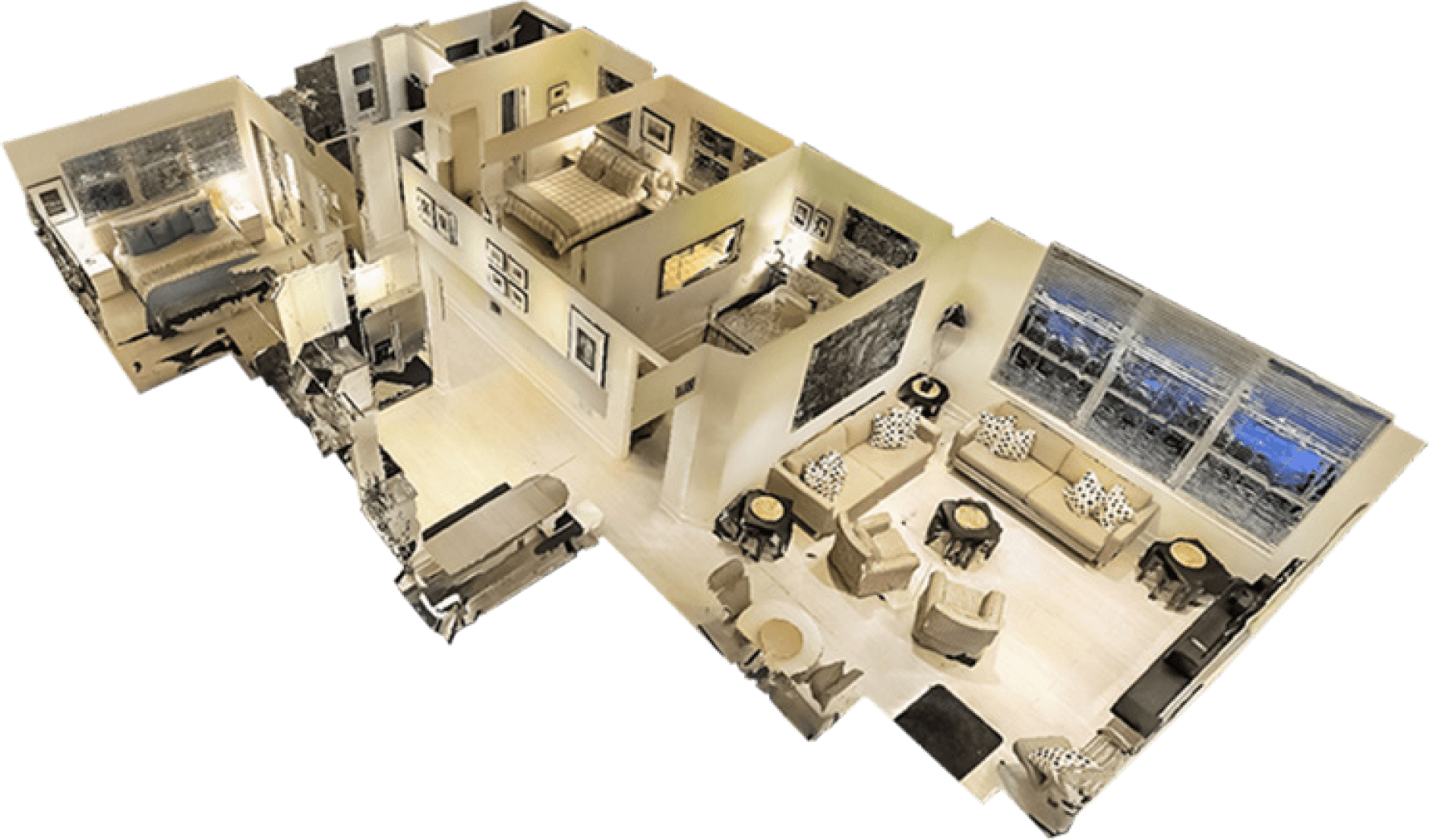
The software excels in creating realistic 3D models and immersive experiences, which are crucial for showcasing properties effectively. However, the process of automatically building tours can be slow, which might be a concern for users with time constraints.
While Matterport’s own cameras are prohibitively expensive, they do offer the best 3D models. But it’s worth noting that Matterport is also compatible with much cheaper consumer 360 camera like the Insta360 X3.
While Matterport popularised the 3D model scan it’s no longer the only VR tour software that can do this. If you are not using the Lidar capable Matterport cameras then you may want to check out some of the other options first.
Kuula
Price: From From $9.99 Per Month for 5-20 Spaces
Difficulty: 1/5
Website: https://kuula.co/
Kuula has become one of the most popular online VR tour creators since its creation in 2016. There’s a free option with limited functionality if you just want to upload some 360 shots, but anyone wanting a professional service will need to subscribe to the premium option.
Kuula has a super simple user interface that allows you to combine your images view a range of hotspot designs. You can add images, maps, text, music and other interactive features.
You are able to create an unlimited number of tours and add combine them into your website without Kuulas branding. Overall Kuula is probably the easiest of the VR tour software to use.
Concept3D
Concept3D is designed with businesses and educational institutions in mind, offering interactive 3D maps and comprehensive virtual tour features.
The platform enhances online interaction and exposure, making it a valuable tool for marketing and virtual showcasing. Its wayfinding solutions are particularly useful for navigating large campuses or complex buildings.
However, pricing details require direct inquiry, which might be a consideration for budget-conscious users. Concept3D is an excellent choice for large institutions and businesses that require a rich, navigable virtual experience, such as universities, corporate campuses, and hospitals.
My360
Price: From From $9.99 Per Month for 5-20 Spaces
Difficulty: 1/5
Website: https://my360tours.com/
My360 is a cloud-based virtual tour software that allows users to create and edit tours with 360 images, floor plans, and 3D models. It’s probably the most basic option on this list but it’s also the cheapest with prices starting at $45/39 per year.
You’ll have a white-label option, enabling users to add personal branding, and a free live video chat feature in every tour. The platform offers an advanced Content Management System for creating unlimited interactive tours, and the tours can be shared via email or embedded in websites.
My360 is an easy to use platform and is very cost effective. It would suite those starting out in VR tour creation.
Pano2VR
Price: 449 Euro’s
Difficulty: 4/5
Website: https://ggnome.com/pano2vr/
Pano2VR is another high end VR tour software that isn’t subscription based. Download the software to your desktop and purchase a licence key to get full access. You can practise for free but with watermarks.

Compatible with various platforms and accessible across different devices, including VR, the software features a Tour Map and a Patch mode for editing specific regions of panoramas.
The user interface is slightly dated and has a fairly steep learning curve, but once you learn the basics you can create quite dynamic VR tours.
The initial cost for a license might be a consideration for some users, but Pano2VR is an ideal choice for creating advanced immersive and interactive content. This is a software for larger VR tours with advanced interactive features
Cupix
Cupix is another VR tour software that features the doll-house effect that Matterport has made popular. With Cupix you walk around to record a 360 video of your space and the software will automatically create your dollhouse effect and virtual tour.
This software has become a popular choice in the construction industry due to its ease of use and how quickly you can create digital twins of your spaces. The pricing depends on the size of the space and the features you require.
So which of these should you choose? Like I mentioned at the start this will depend on the scale of your VR tour operation and your budget. I think the best value option in Kuula which provides some advanced features for a reasonable cost. It’s also becoming an industry standard with automatic uploads to various real estate property sites.
For more complex VR tours 3DVista is the most comprehensive and can produce the most dynamic and feature pact virtual tours, but it has by far the biggest learning curve.


Owner of threesixtycameras.com. Writer, photographer and videographer. You can see my YouTube channel for guides of how to shoot 360 video. I've written for The Times, Digital Photography School and Sunday Express.