 The 360 Guy
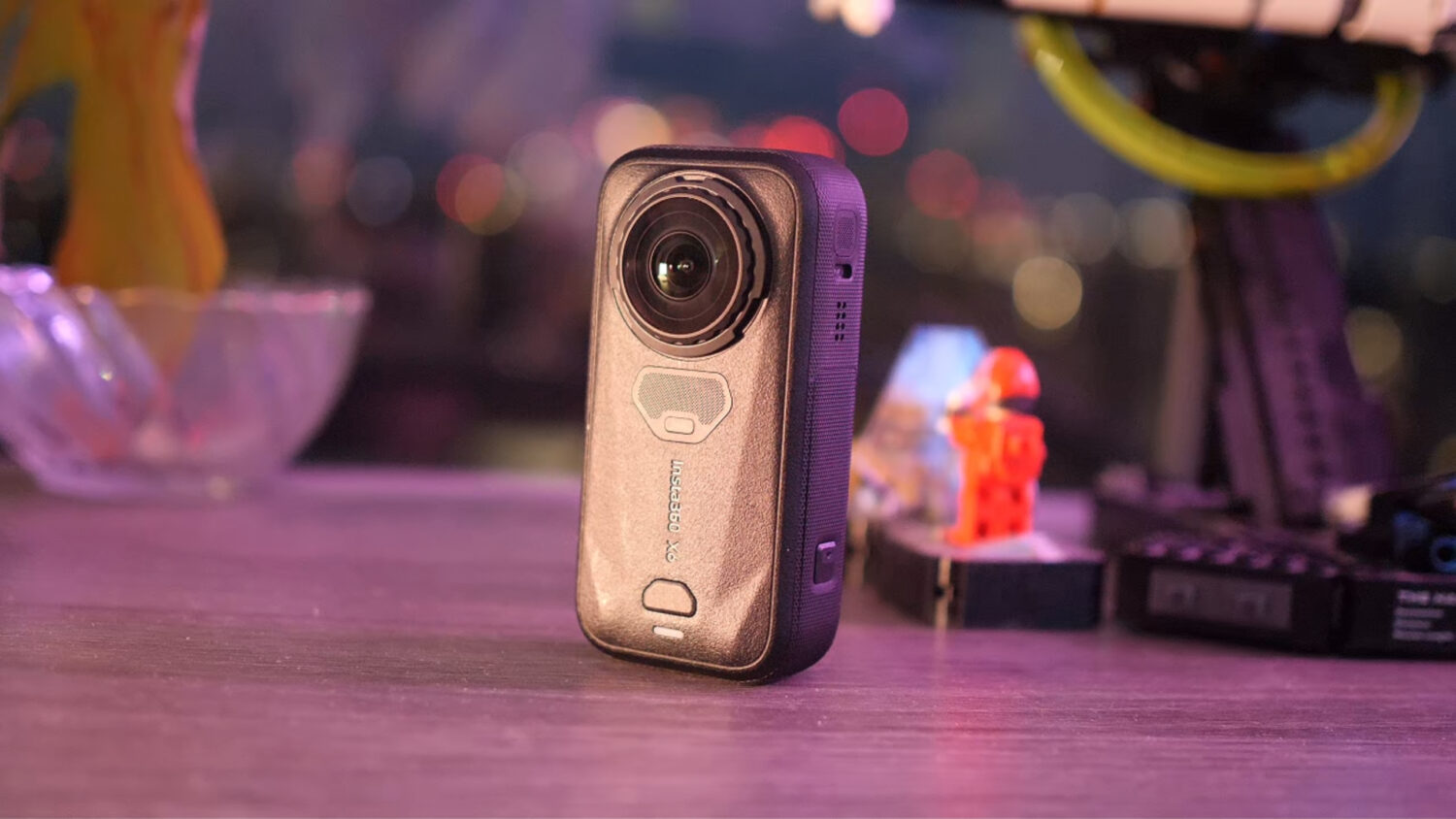
Can shorter and fatter mean better? In this case, yes. The Insta360 X6 takes a different approach to most previous X-series upgrades. It has a shorter, wider body, a larger touchscreen and some headline-grabbing specifications, including 8K video at 50fps, larger sensors and 10-bit colour.

However, the specs only tell you so much. I have been using the Insta360 X6 alongside the X5 in a range of daytime, dusk and low-light conditions to find out where the difference is genuinely visible and where it is mostly marketing.
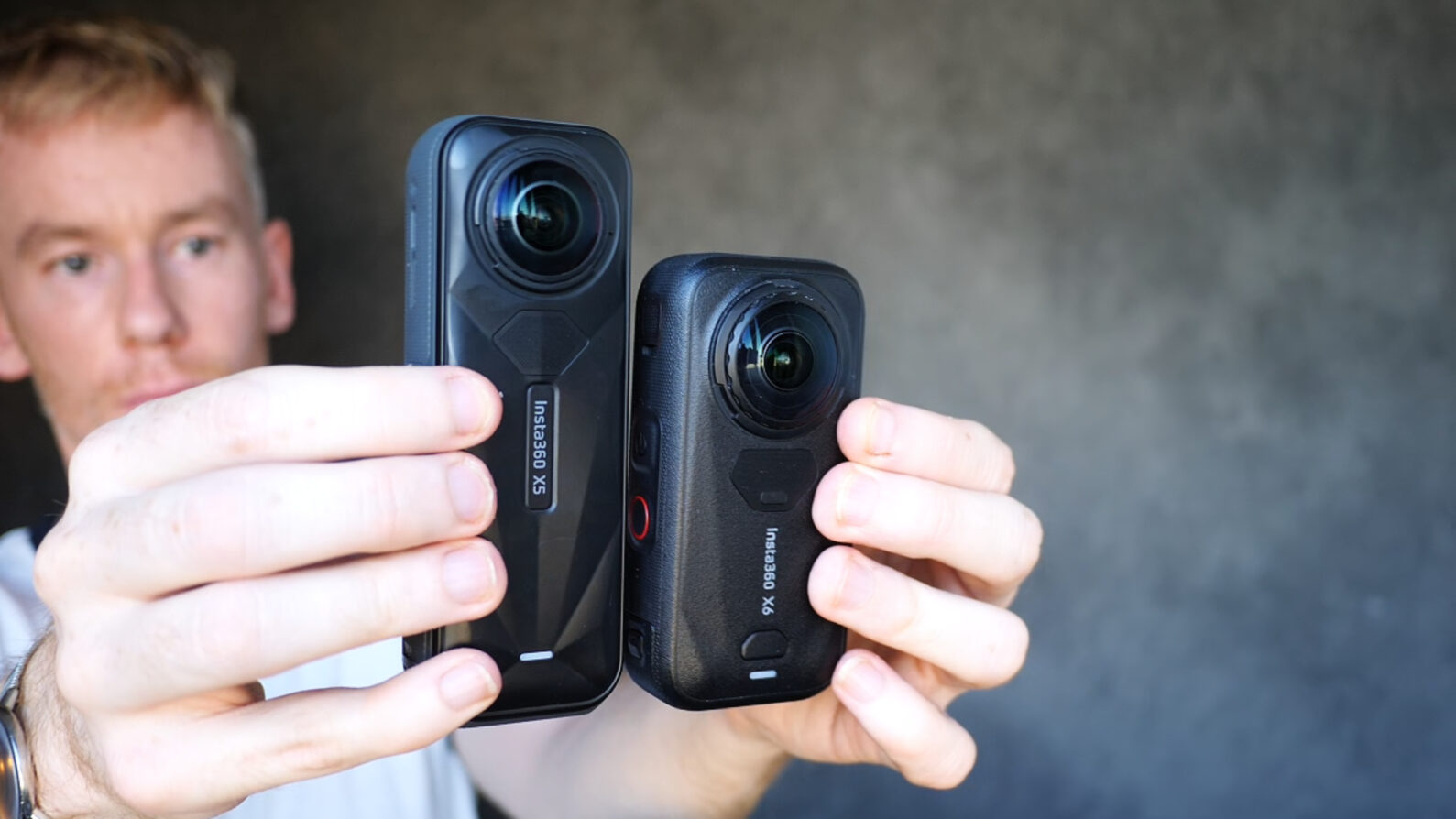
The short version is that the Insta360 X6 is the better camera (although it would be weird if it wasn’t). Its larger sensors, improved dynamic range, 10-bit colour, longer battery life and internal storage make it the most capable X-series camera so far. However, the difference is much clearer at night and around sunset than it is in bright daylight. If you already own an X5, this is a decent upgrade rather than a transformative one.
If you want to compare footage from the X6 and X5 at your own pace, check out my Camera Comparison Tool.
Insta360 X6 vs X5: quick verdict
Buy the Insta360 X6 if you want the best image quality available from an Insta360 consumer 360 camera, regularly shoot at dusk or at night, like to get into colour grading your footage, film fast action or value longer battery life and internal storage.
Keep or buy the Insta360 X5 if you mostly film in daylight, do not need 10-bit video or 8K at 50fps, already own several X5-specific accessories, or can find it at a significantly lower price.
For a new buyer, I would choose the X6 if the price difference is manageable (because like all tech, it’s getting more expensive). For an existing X5 owner, the decision depends much more on when and how you shoot.
Insta360 X6 vs Insta360 X5 specifications
| Feature | Insta360 X6 | Insta360 X5 |
|---|---|---|
| Sensor size | Dual 1/1.1-inch sensors | Dual 1/1.28-inch sensors |
| Maximum 360 video | 8K at up to 50fps | 8K at up to 30fps |
| 10-bit video | Yes | No |
| Dolby Vision | Yes | No |
| Maximum 360 photo resolution | 120MP | 72MP |
| Maximum single-lens video | 5K at 60fps | 4K at 60fps |
| Super-wide single-lens video | 5K at 30fps | 4K at 30fps |
| Maximum timelapse resolution | 8K | 11K |
| InstaFrame output | Up to 4K at 30fps | Up to 4K at 30fps with the latest update |
| Internal storage | 47GB usable storage | None |
| Battery capacity | 2600mAh | 2400mAh |
| Claimed maximum runtime | Up to 233 minutes | Up to 208 minutes in Endurance Mode |
| Waterproofing | 20m without a case | 15m without a case |
| Replaceable lenses | Yes, with an easier replacement system | Yes |
| Weight | Approximately 195g | 200g |
Battery runtimes are manufacturer maximums recorded under specific settings and conditions. Expect shorter results at demanding resolutions and frame rates.
Design and handling
The X6 is the first major redesign of the X-series in quite some time. Instead of the tall, narrow shape used by the X5, the camera is shorter and wider. I actually find this body easier to carry around, and the more compact shape feels better balanced when mounted on a selfie stick.
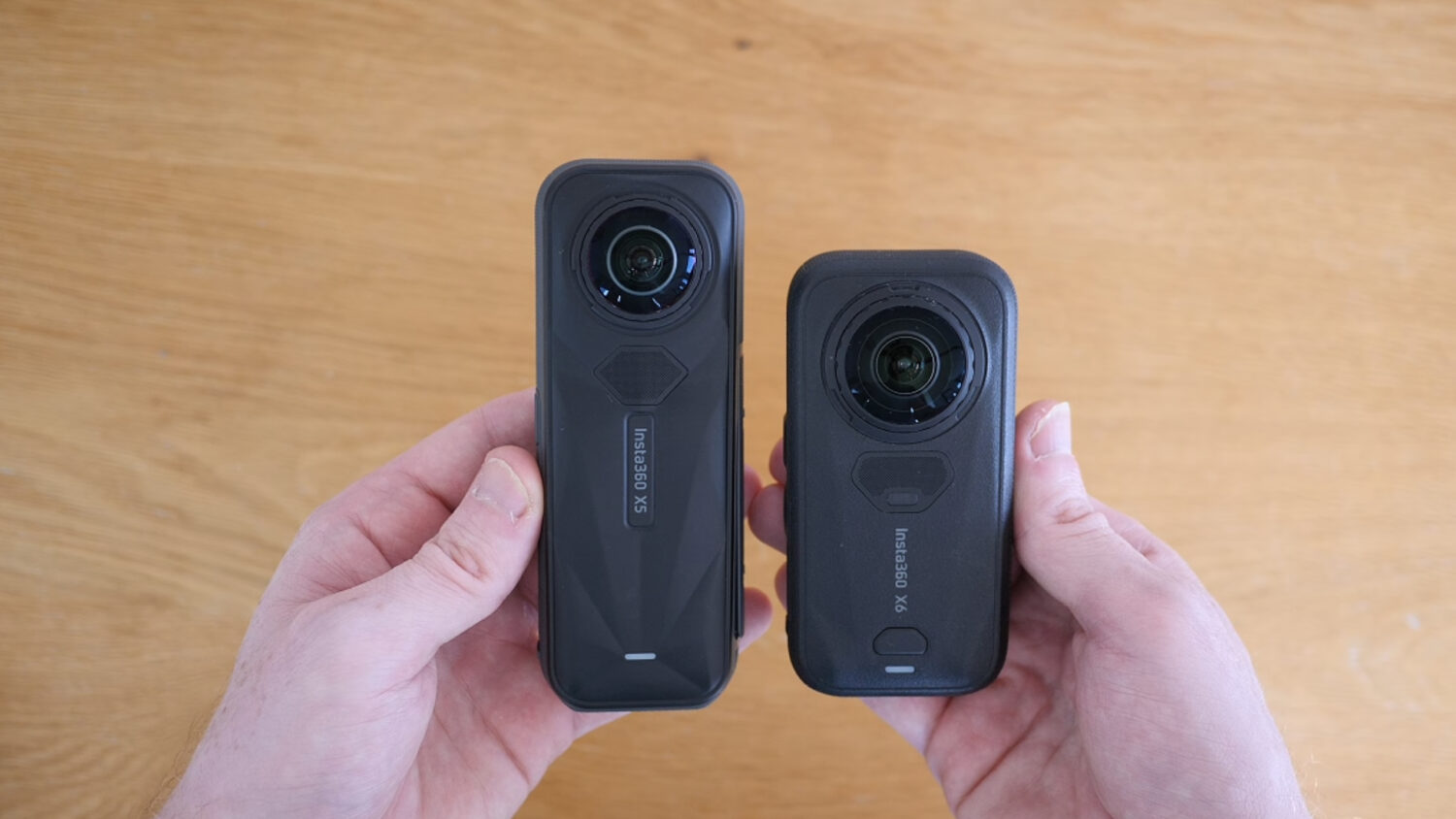
The larger and brighter screen is also a genuine improvement. It is easier to see outdoors, gives you more room to navigate the menus and is accompanied by improved haptic feedback.
However, I do not like the move to a fully touch-based interface or the lack of a conventional physical shutter button. I sometimes struggle to press the shutter correctly on the touchscreen, particularly when I am trying to start recording quickly. A physical button gives you instant confirmation and is easier to use while wearing gloves, holding the camera at an awkward angle or concentrating on an action shot.
This is one area where the newer design feels like a step backwards. The X6 looks cleaner and more modern, but I would still prefer a proper shutter button.
Accessory compatibility
The change in body shape also means that some form-fitting X5 accessories will not work with the X6. The most obvious example is the dive case, but the same issue may apply to cages, frames and other accessories designed around the X5 body.
Selfie sticks and accessories using a standard mounting point should be less of a problem, but anyone with a large collection of X5 accessories should check compatibility before upgrading. The cost of replacing accessories can make the real price of moving to the X6 considerably higher than the price of the camera alone.
Waterproofing
The X6 is waterproof to 20 metres without a case, compared with 15 metres for the X5. That sounds impressive, but it is not as useful for 360 video as it first appears.
Underwater refraction causes stitching and distortion problems when a dual-lens 360 camera is used without a properly designed dive case. I would therefore still use an Invisible Dive Case for serious underwater footage. The extra waterproofing is reassuring protection, but it does not make the dive case redundant.
47GB of internal storage
For me, the best new hardware feature is not the screen or the redesigned body, it is the 47GB of usable internal storage.
I have occasionally arrived somewhere ready to shoot and realised that I have left the microSD card in my computer. The X5 cannot record anything in that situation. With the X6, the internal storage gives me enough space to continue filming until I can insert or replace a card.
47 gigabytes will not last long when recording high-bitrate 8K 360 video, so I would not treat it as a replacement for a good microSD card. As emergency storage, however, it is extremely useful.
360 video quality
Video quality is the most important part of this comparison, and it is where the X6 makes its strongest case.
The X6 uses two larger 1/1.1-inch sensors, compared with the dual 1/1.28-inch sensors in the X5. Be careful with the wording here: these are 1/1.1-inch-type sensors, not full 1.1-inch or one-inch sensors. Even so, the increase is large enough to make a visible difference.
Daylight video
In good daylight, the difference between the cameras is visible but not dramatic. The X5 was already capable of producing very good 8K 360 footage for an action camera, and the X6 does not suddenly make it look outdated.
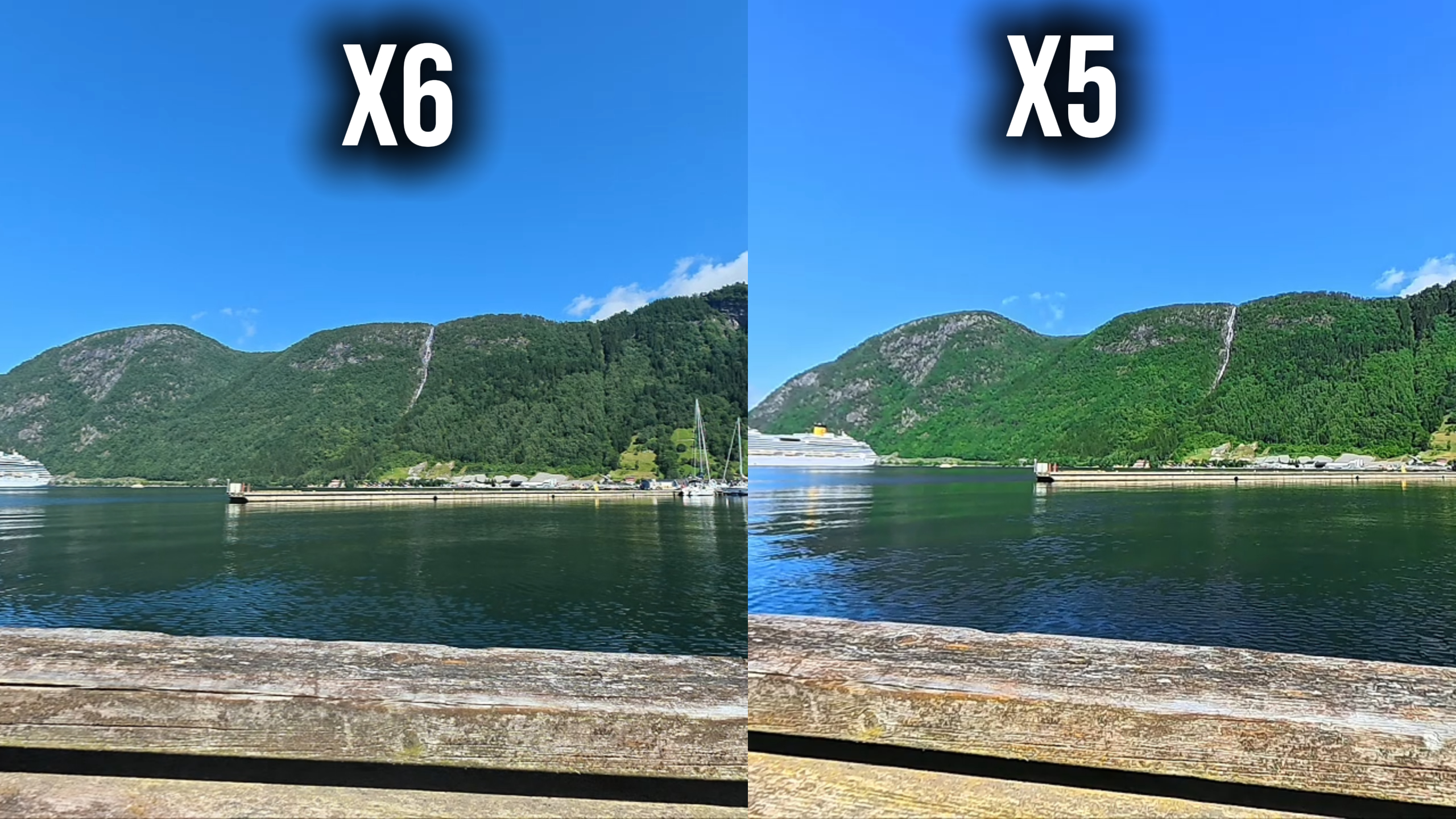
What I notice most is that X6 footage looks a little more natural. There is less aggressive artificial sharpening, which is a good thing, while fine details in grass, trees and clouds are reproduced more convincingly. Bright skies also retain more information, particularly in scenes with a mixture of strong highlights and darker foregrounds.
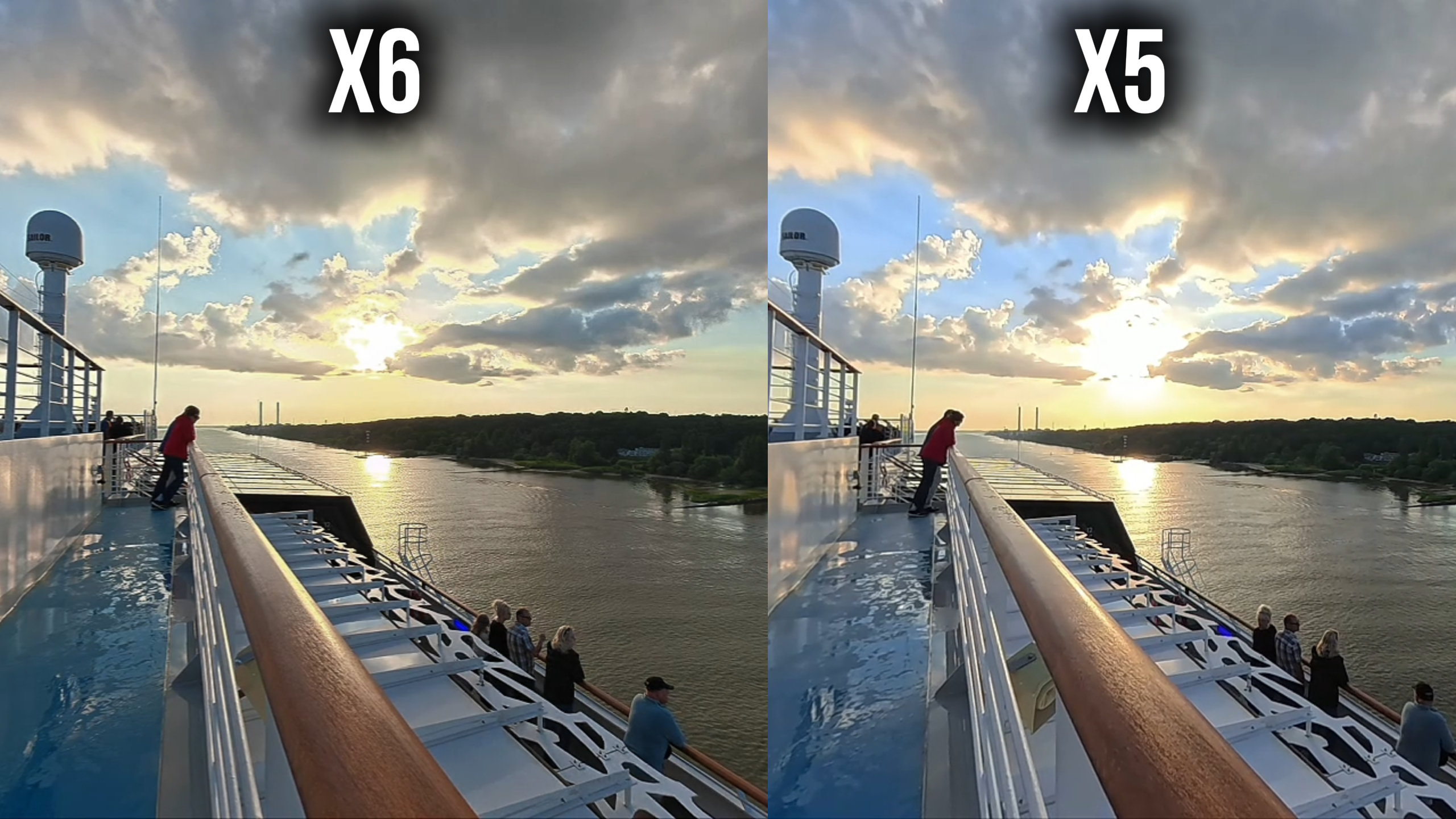
If you only compare the centre of a bright, evenly lit shot, you may struggle to see a huge difference. Look at foliage, textures, shadow detail and clouds, and the X6 starts to pull ahead.
Low-light and dusk video
The advantage becomes much clearer at dusk and at night. This is where I can most easily see the benefit of the larger sensors.
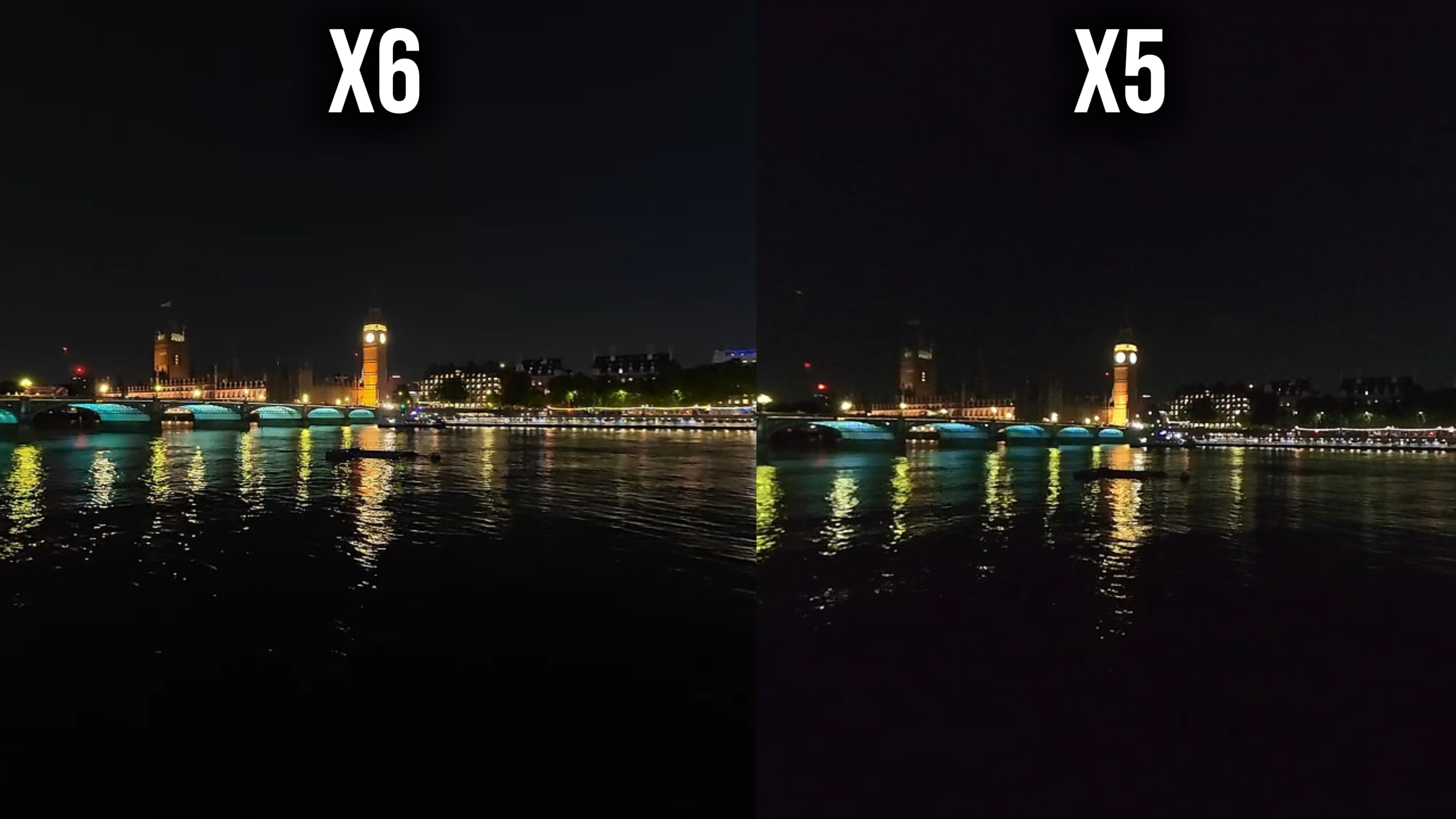
The X6 produces less noise, holds on to more colour and preserves a wider range between shadows and highlights. Dark areas look cleaner, while streetlights, illuminated signs and bright skies are less likely to turn into featureless patches. Exactly what you would 3expect of a larger sensor .
The X5 remains a capable low-light 360 camera, particularly when using PureVideo, but the X6 gives you a cleaner and more flexible starting point. If you regularly shoot city scenes at night, sunsets, indoor events or anything around blue hour, this is probably the strongest reason to upgrade.
10-bit colour makes a real difference
The addition of 10-bit video is more important than it may sound. An 8-bit file can represent around 16.7 million colours, while 10-bit video can represent over one billion. That does not mean every shot suddenly looks one billion times better, but it gives the camera far more colour information to work with.
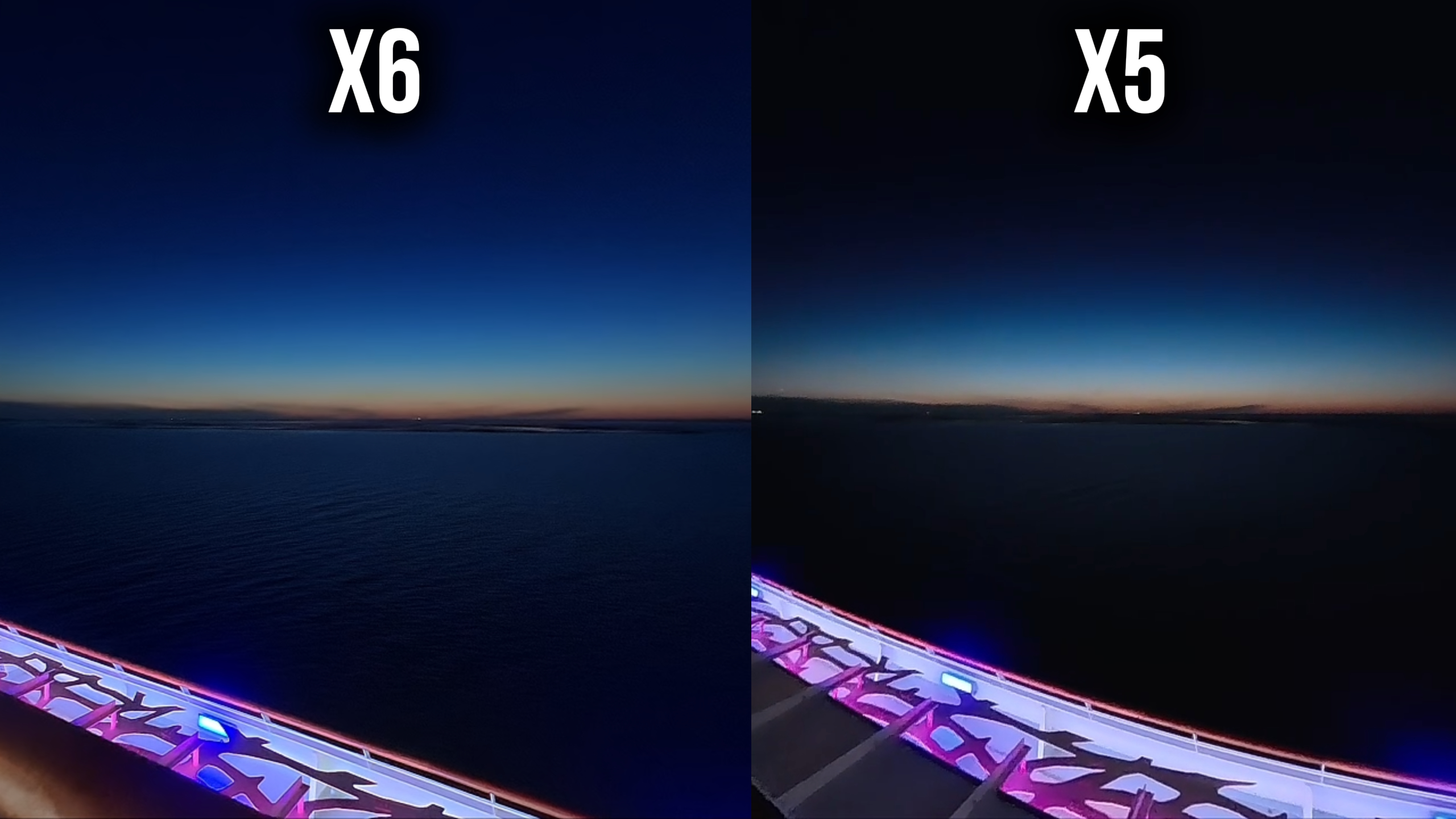
I see the difference most clearly in sunsets, dusk skies and other scenes containing gradual colour changes. Banding is far less obvious on the X6, and there are more subtle shades visible than in equivalent X5 footage.
Ten-bit recording also gives you more room for colour correction. If you regularly grade footage or try to match a 360 camera with video from another camera, the X6 files hold up better when you start pushing colour and exposure.
For someone who shoots mostly in standard colour and uploads with minimal adjustment, this may not be the feature that convinces you to upgrade. For more serious editing, it is one of the X6’s most valuable improvements.
8K at 50fps
The X5 is limited to 8K at 30fps, while the X6 can record 8K at up to 50fps. This gives the X6 smoother motion and more flexibility for slowing footage down.
In many normal walking or travel shots, I do not see a huge difference between 8K30 and 8K50 once the footage has been reframed and exported. The benefit becomes much more obvious with faster movement: cycling, skiing, running, driving or any shot where the camera or subject is moving quickly.
There is also an important regional limitation. Fifty frames per second fits neatly into PAL workflows, but it is less convenient for creators in countries that commonly use 30fps or 60fps NTSC timelines. It can also be more prone to flicker under some 60Hz artificial lighting. US users can still shoot 8K50, but 8K60 would have been a more universally useful headline mode.
Overall, I see 8K50 as a welcome option rather than a reason on its own to replace the X5. Action camera users will benefit most.
Dolby Vision
Dolby Vision is designed to use dynamic metadata to optimise brightness, contrast and colour for each scene on a compatible display. In theory, this allows footage to be presented more accurately across different shots and screens.
At the moment, the practical benefit is less clear to me. Playback and editing support is still dependent on compatible devices and software, with the smoothest experience currently limited to parts of the Apple ecosystem and selected displays.
I have not seen a huge improvement compared with footage shot in a standard mode and given some basic colour correction. That may change as support improves, but I would not buy the X6 for Dolby Vision alone. It may also be the case that I’m just not using it correctly!
Photo quality
The X6 increases the maximum 360 photo resolution from 72MP to 120MP. As with video, the resolution number is not the whole story, but the resulting images are noticeably better.
I can see more detail when zooming into 360 photos, while the larger sensors improve dynamic range and low-light performance. Fine textures look cleaner and there is more flexibility when extracting a conventional flat image from the full 360 photo.
The improvement follows the same pattern as video: obvious when inspected closely or shot in difficult light, but less dramatic when viewing a well-lit image at normal social-media sizes.
AI Photo Frame
AI Photo Frame makes it easier to turn 360 photos into short animated videos. The software analyses the image, identifies the main subjects or features and creates camera movements around them.
It is more accurate than previous automated tools and can save time when you want a quick social post. It does not always identify the part of the image I consider most important (like most AI features) but it generally provides a better starting point than before.
Single-lens mode
The X6 also receives a modest improvement when used as a conventional single-lens action camera. It can now record up to 5K at 60fps, with a super-wide 5K30 option, compared with the X5’s maximum 4K60 single-lens mode.
The extra resolution is useful for chest-mounted cycling and similar situations where the very wide field of view and stabilisation matter. It makes the X6 more flexible if you only want to carry one camera.
I still would not buy either model primarily for single-lens shooting. A recent flagship phone will usually produce better results for general travel footage, particularly when it comes to fine detail, HDR, exposure and ease of use. A dedicated action camera can also be a better choice for traditional POV footage.
Single lens mode is a useful bonus, but the reason to buy an X6 or X5 remains its ability to capture everything in 360 degrees.
InstaFrame 2.0
InstaFrame has been upgraded on both cameras. The mode records a ready-to-share flat video while retaining a 360 version, allowing you to get usable footage quickly without giving up the option to reframe it later.
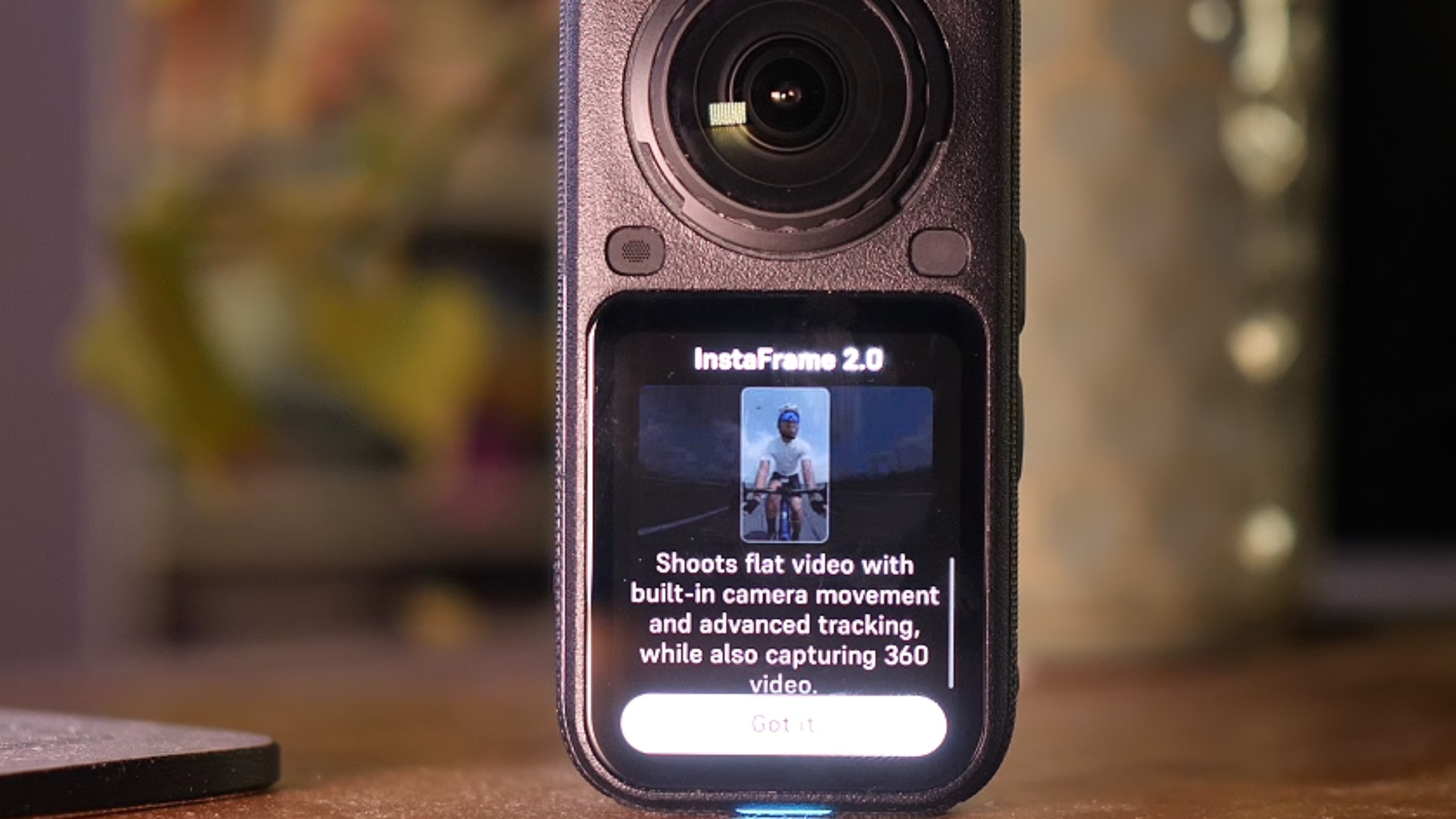
Tracking is now more accurate, and on the X6 the flat output can be recorded at up to 4K30. This is particularly useful for hiking, skiing and vlogging, where the main requirement is simply for the camera to keep you in the frame.

When it works well, almost no editing is required. This is one of the few “no editing” features I genuinely find useful because it reduces the work without completely removing your ability to make changes later.
Battery life
The X6 has a larger 2600mAh battery and its improved endurance is noticeable in real use. Manufacturer figures claim up to 233 minutes under specific low-demand settings, compared with up to 208 minutes for the X5 in its Endurance Mode, but my own timelapse test was more revealing.
During a three hour timelapse, the X5 battery ran out while the X6 still had around 30% remaining. Exact results will vary with settings, temperature, screen use and wireless connections, but this was a substantial practical difference.
Battery life is especially important with a 360 camera because long recordings, timelapses and processor-heavy modes can consume power quickly. The X6 gives me more confidence that I can finish a long shot without swapping batteries or connecting an external power source.
The downside for existing owners is that the redesigned body means you should not assume that every X5 power accessory or battery-related accessory will transfer across.
Replaceable lenses
The X5 was the first X-series camera to offer fully replaceable outer lenses. That was an important addition because exposed fisheye lenses are extremely easy to scratch, but I did not find the original replacement process especially user friendly.
The X6 keeps replaceable lenses and improves the mechanism, making them easier to remove and install. This is the kind of upgrade that may not generate dramatic promotional footage, but it makes the camera easier and less stressful to own.
I would still use lens guards in situations where the camera is likely to hit the ground or another object. Replaceable lenses reduce the cost and inconvenience of damage; they do not make the camera indestructible.
Software and AI editing
Insta360 is pushing AI features harder than ever with the X6. Some are genuinely useful and the results are better than last year, particularly subject detection, automatic reframing and simple vlog-style edits.
AI Director can create a decent basic edit without requiring you to keyframe every shot manually. AI Photo Frame and the improved InstaFrame tracking also reduce the amount of work needed to produce something shareable.
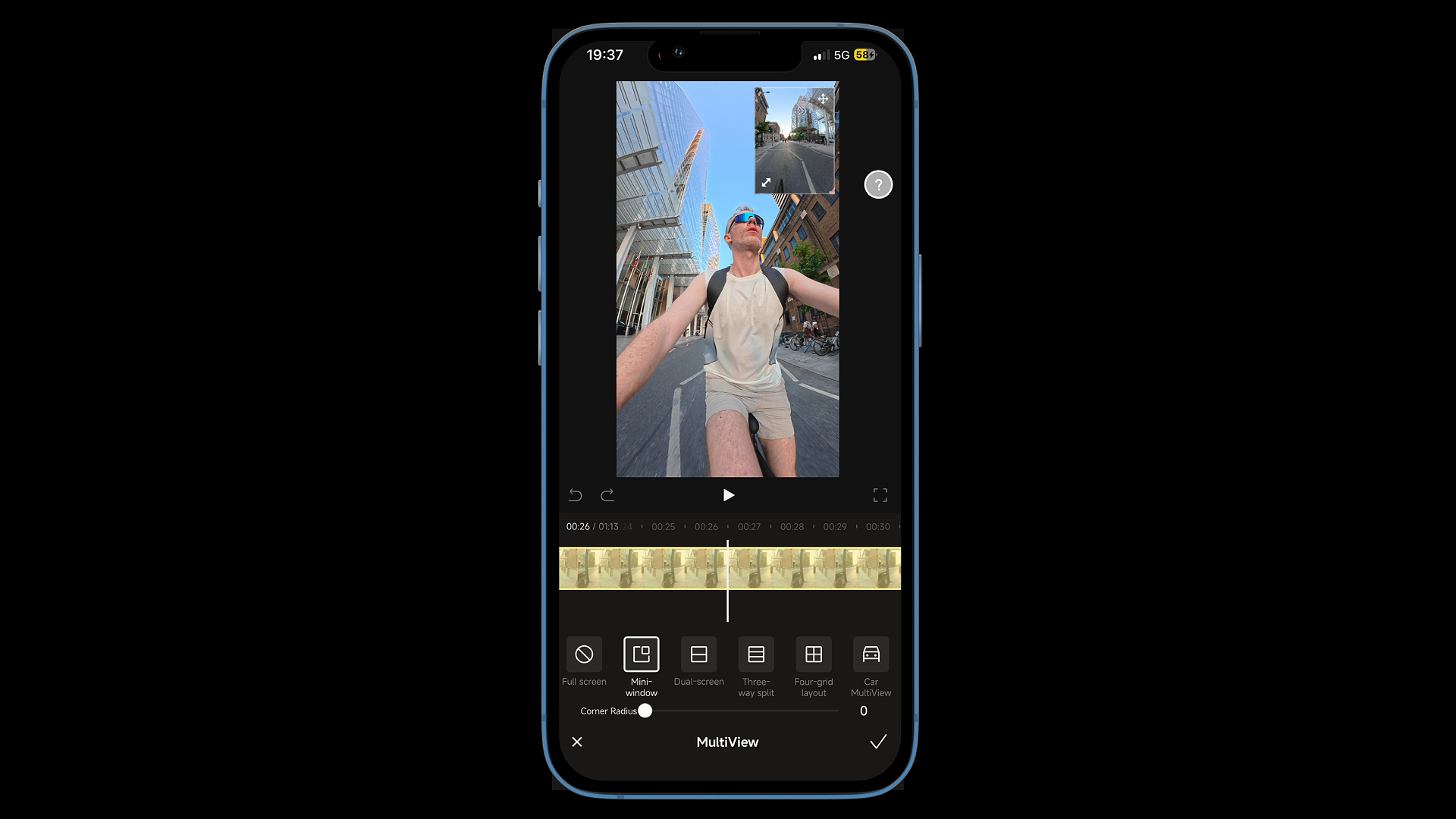
However, I question the broader “no editing” message. The main creative advantage of a 360 camera is that it records every direction and allows you to decide how the viewer moves through the scene. In my experience, 360 footage still looks best when you take the time to reframe and edit it yourself.
The phone also has to work hard to process many of these AI tools. Long or complex edits can consume battery quickly and make the device warm. AI should remain an optional shortcut rather than the only area receiving attention.
I would like Insta360 to put equal effort into making manual editing faster and more precise. Better keyframe controls, a smoother workflow and more flexible exports would help experienced users just as much as another one-tap effect.
What has not changed?
Both cameras retain the core features that make the X-series popular:
- 360-degree capture that lets you choose the angle after recording
- The Invisible Selfie Stick effect
- FlowState stabilisation and 360-degree Horizon Lock
- PureVideo for improved low-light footage
- Replaceable lenses
- Voice and gesture controls
- Editing through the Insta360 mobile app and Insta360 Studio
The X5 therefore still delivers the complete modern Insta360 experience. The X6 improves the quality and convenience of that experience rather than replacing it with something fundamentally different.
Should Insta360 X5 owners upgrade to the X6?
If you already own an X5, I would only call the X6 an essential upgrade for certain types of user.
The upgrade makes the most sense if you:
- Frequently shoot at dusk, at night or indoors
- Want 10-bit footage for colour grading
- Film fast action and will use 8K50
- Regularly run out of battery during long recordings
- Want internal storage as an emergency backup
- Shoot high-resolution 360 photos
You can comfortably keep the X5 if you:
- Mainly film in bright daylight
- Usually export short clips for social media
- Are happy with standard colour and minimal grading
- Own expensive X5-specific cases and accessories
- Regularly use the X5’s 11K timelapse mode
- Do not need the higher frame rate or longer battery life
I can see the improvement when comparing footage side by side, but ordinary viewers may not notice a dramatic difference in a bright daytime Instagram or YouTube clip. The X5 remains a very good 360 camera.
Which camera should a new buyer choose?
For a first-time buyer, the decision mostly comes down to price.
If the X6 is within your budget, it is the better long-term purchase. The larger sensors, 10-bit colour, better battery life, higher photo resolution and internal storage all make it more versatile. It is also better equipped for the more demanding situations where compact 360 cameras have traditionally struggled.
The X5 becomes the smarter choice when it is heavily discounted. It records the same maximum 8K resolution at 30fps, uses the same excellent editing ecosystem and still offers replaceable lenses, strong stabilisation and very good daytime image quality.
Insta360 X6 vs X5: final verdict
The Insta360 X6 is the best of the two cameras, but it is an evolution rather than a revolution.
The strongest improvements are the ones that affect difficult shooting conditions: cleaner low-light footage, better dynamic range, more natural detail and 10-bit colour with far less visible banding. Battery life is also noticeably better, and the 47GB of internal storage solves a very real problem for anyone who has ever forgotten a microSD card.
I like the shorter, wider body and the brighter screen, but I miss having a proper physical shutter button. The reduced timelapse resolution is also a strange and disappointing downgrade. Dolby Vision and some of the newer AI tools feel less important to me than the marketing suggests.
Overall, the X6 video quality is a decent step up from the X5, particularly at dusk and at night. It is not transformative, but given the limits of current compact 360 camera technology, it is probably close to the best improvement we could reasonably have expected in one generation.
Frequently asked questions
Is the Insta360 X6 video quality better than the X5?
Yes. The X6 produces cleaner low-light footage, improved dynamic range, more natural fine detail and better colour. The difference is most obvious at dusk, at night and in high-contrast scenes. In bright daylight, the improvement is noticeable but much smaller.
Does the Insta360 X6 shoot 8K at 60fps?
No. Its maximum 360 video frame rate at 8K is 50fps. This is a useful improvement over the X5’s 8K30 mode, but 50fps is less convenient for users working primarily with 30fps or 60fps NTSC timelines.
Does the Insta360 X6 have internal storage?
Yes. The X6 has 47GB of usable internal storage. I would still recommend a high-capacity microSD card for regular 8K filming, but the built-in storage is extremely useful as a backup.
Can Insta360 X5 accessories be used with the X6?
Some standard mounting accessories and selfie sticks should work, but accessories moulded around the X5 body may not. The X5 dive case, for example, is not compatible with the shorter and wider X6 design.
Can you use the Insta360 X6 underwater without a dive case?
The camera is waterproof to 20 metres without a case, but I still recommend a compatible Invisible Dive Case for 360 video. Water refraction can cause distortion and poor stitching when the bare fisheye lenses are used underwater.
Is the Insta360 X6 worth upgrading to from the X5?
It is worth upgrading if you regularly shoot in low light, want 10-bit colour, film fast action at 8K50 or need longer battery life. If you mainly shoot in daylight and are happy with the X5’s image quality, the improvement may not be large enough to justify replacing a one-generation-old camera.


Owner of threesixtycameras.com. Writer, photographer and videographer. You can see my YouTube channel for guides of how to shoot 360 video. I've written for The Times, Digital Photography School and Sunday Express.